Simple by design.
Powerful by default.
Run the tool, annotate the UI, point your agent at the task list. That is the whole workflow — this page is the ten-minute version, including every command.
What you need
Required
Node.js 22 or later
Vibeflow runs on Node.js. Install it from
nodejs.org
or your package manager, then check with node --version.
Nothing else is required — no account, no database, no browser extension.
Recommended
React in dev mode, or source maps
Development mode exposes component names, source files and line numbers,
so every annotation arrives with exact context. Run
next dev, or enable source maps in your build.
Without them everything still works — the selector is still captured.
The three steps
From annotation to merge.
One command. Board up, overlay armed.
Run one command. It starts the local server, opens the kanban board and
serves the annotation overlay. Then inject the overlay into the app you
have running — the server listens on
localhost:3700 and the overlay talks only to your
machine.
-
Your running app — add the script tag before
</body>. -
Any page, no code change — drag the bookmarklet from
localhost:3700/injectto your bookmarks bar. -
Static folder — or let the server do it for you:
serve ./my-appopens with the overlay already injected.
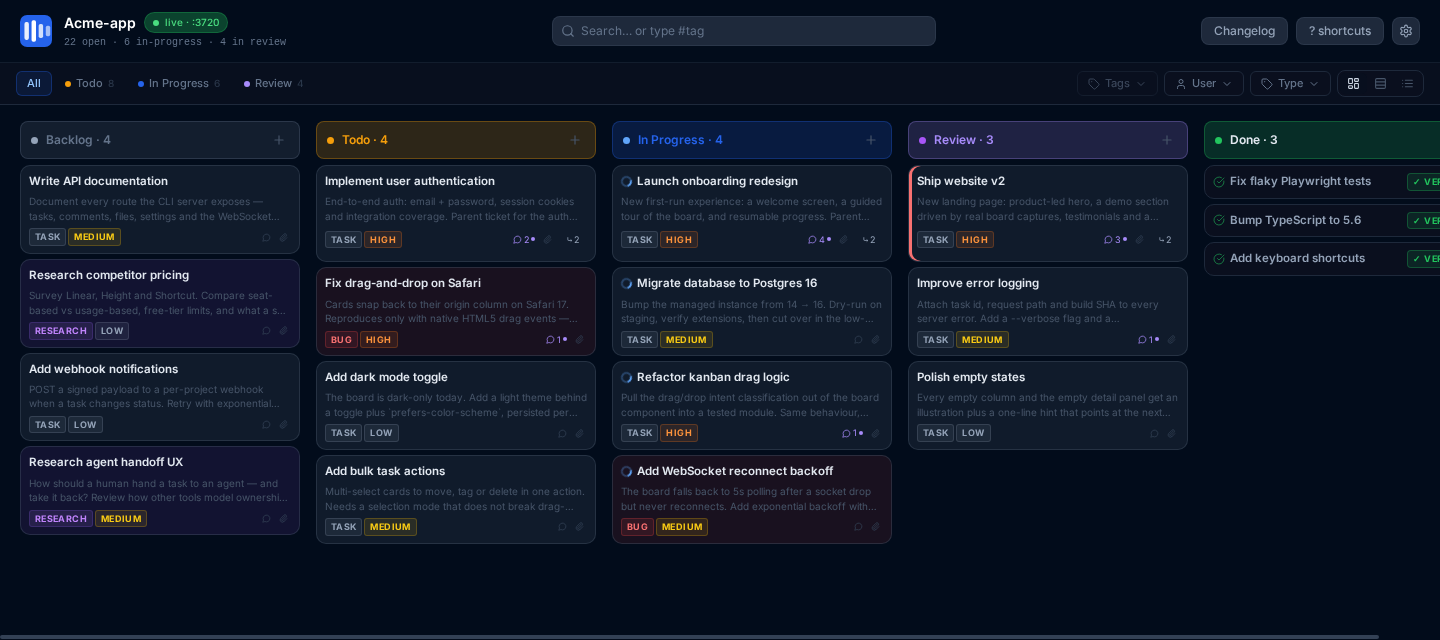
localhost:3700 —
the same tasks your agent reads with tasks --next.
Click it. Name it.
Press Alt+A (or click the overlay trigger) to enter annotation mode, then click the element that is wrong. Hovering shows the selector before you commit to anything.
Type one line, set a priority, optionally paste a screenshot. Tasks are
written straight to .vibeflow/ — versioned in
git and visible on the board immediately.

Your agent claims it.
This is the whole agent integration: one command that claims the highest-priority todo task, flips it to in-progress and prints the full context. Implement, then mark it review with a comment.
Claiming is atomic, so run as many agents as you like — they will never collide on the same task.

The magic prompt for your agent
Drop this into GitHub Copilot, Claude Code, Cursor, Windsurf or opencode.
--next claims the task atomically — safe even when
several agents are running in parallel.
CLI reference
All commands, at a glance.
Run npx @vibeflow-tools/cli <command> --help
for the full flag list of any command.
| Command | What it does |
|---|---|
| Serving | |
kanban [dir] |
Start the Vibeflow server and open the live Kanban board in the
browser. Flags: -p, --port (default 3700),
--host, --no-open,
--no-changelog.
|
serve [target] |
Serve HTML prototype(s) with the live overlay, or start an API-only
task server for an app you already have running. Flags:
-p, --port (default 3700), --host,
--no-open.
|
| Tasks — the agent workflow | |
tasks --next |
Agent workflow. Pick the highest-priority todo task, move it to in-progress and print it ready to work on. |
tasks |
List tasks. Filter with --status, --type,
--user or --tag, cap the count with
--limit, and add --json for
machine-readable output.
|
tasks --get <id> |
Full detail for one task: description, comments, files, linked commits. Accepts a partial id prefix. |
tasks --add --title "…" |
Create a task without touching the browser.
--title is required; optional
--description, --tag,
--priority and --parent.
|
tasks --edit <id> |
Update a task: --set-status, --title,
--description, --set-parent or
--no-parent. Moving to review requires
--comment, and auto-commit adds
--commit-message.
|
tasks --commit --task <id> |
Commit staged changes and link the resulting SHA to the task
(--message sets the commit message).
|
tasks --reindex-sort-keys |
One-time maintenance: re-key keyless or duplicate tasks so the
rendered Kanban order survives. Honors
--dry-run and --json.
|
| Verification | |
verify <task-id> |
Verify a task against its baseline snapshot, or explore captured
evidence with a tool: style_query,
style_diff, element_info or
html_diff. Flags: --json,
--url, --filter.
|
auth |
Manage stored auth state (encrypted cookies for Playwright
verification): --list or --clear.
|
| Automation | |
watch [dir] |
Watch the task store and emit an event on every new, moved or updated
task. Add --json for JSONL,
--output <file> to append to a file,
--webhook <url> to POST each event to your own
service, or --once for a single poll.
|
| Other | |
changelog |
Show the changelog — latest version by default, or --all for the full history. |
telemetry |
Manage opt-out anonymous usage telemetry:
--status, --enable,
--disable. Nothing personal is ever collected.
|
If something looks wrong
Common questions.
The overlay does not appear on my page.
Check that the server is still running — the overlay script is served
from it, so closing the terminal closes the overlay. Then check the
browser console for a blocked request: some content security policies
reject scripts loaded from another origin, in which case allow
localhost:3700.
My annotations have a selector but no file or line number.
That is the production-build case. File and line numbers come from
development mode or source maps, so run your app with
NODE_ENV=development (the default for
next dev) or enable source maps in the build.
The selector is always captured either way.
An agent said there were no tasks available.
--next only picks up tasks in
todo. Run tasks --status backlog to see
anything still parked, then move what is ready with
tasks --edit <id> --set-status todo.
Where do I put my tasks so my team sees them?
Local mode is git-native: add .vibeflow/ to
your repository and tasks travel with your code. Shared collaborator
access is currently in a private beta — the local workflow needs no
account at all.
Ten seconds to your
first annotated task.
No account, no cloud, no browser extension.
Apache-2.0 · Node.js 22+ · tasks stay in your repository