Open source · Apache-2.0 · runs locally

Annotate the UI.
Ship the task.

Point at what is wrong in your running app and your AI agent gets a real task — the CSS selector, source file and line number already attached.

No account No cloud Node 22+

  • Apache-2.0Open source, forever free in local mode
  • Local-firstTasks live in .vibeflow/, inside your repo
  • On npmnpx @vibeflow-tools/cli — nothing to install
  • Any agentCopilot, Claude Code, Cursor, opencode

The re-explanation tax

You already found the bug. You just have to describe it.

Reviewing an agent's work is the hidden cost of AI-assisted development. The context lives in the browser, the description lives in your head, and the task lives somewhere else. Vibeflow collapses the three.

  1. 01

    The screenshot tax

    A picture of a broken button is detective work. Your agent needs the element, the file and the line — not a JPEG and a guess.

  2. 02

    The prose tax

    Four paragraphs to describe a layout bug the browser could have named in one click. Every paraphrase loses precision, and the agent guesses at the rest.

  3. 03

    The hand-off tax

    A designer spots it, a message gets sent, a developer re-derives the context ten minutes later. A two-minute fix costs twenty.

How it works

Three steps. About ten seconds.

No extension, no account, no config file. One command starts a local server that injects the annotation layer into any page — including the app you already have running.

  1. 01 Start

    One command. Board up, overlay armed.

    Start the local server and the kanban board opens — the same server serves the annotation overlay. Drop one script tag into the app you already have running, or drag the bookmarklet.

    Nothing is proxied and nothing is rewritten — the overlay is a single script that talks to your machine.

    terminal
    $ npx @vibeflow-tools/cli kanban
     
    <!-- then annotate your running app -->
    <script src="http://localhost:3700/vibeflow-overlay.js"
            data-vibeflow-overlay></script>
  2. 02 Annotate

    Click it. Name it.

    Hover to see the selector, click to pin a task, type one line, set a priority. Vibeflow captures the CSS selector, the React component and the source file and line number for you. Alt+A toggles annotation mode.

    Screenshots attach to the element they describe, and everything lands in .vibeflow/ where it can be committed to git.

    what lands in the task
    selector #signup-form > button.submit component SignupForm file src/auth/SignupForm.tsx:42 priority High
  3. 03 Hand off

    Your agent claims the task.

    Paste one line into Copilot, Claude Code, Cursor or opencode. The agent claims the highest-priority todo task, moves it to in-progress, reads the full context and implements it.

    The claim is atomic, so several agents can run at once without ever picking up the same work.

    paste into your agent
    Get next tasks and implement them:
    npx @vibeflow-tools/cli tasks --next
     
    ▸ claimed a3f2e1b8 · in-progress
    ▸ implement, commit, mark review

Not just annotations

It is a full task tracker, not a demo.

Annotations create tasks — and the tasks live on a board you will actually open. Real hierarchies, real statuses, real history, and a CLI that mirrors every action so your agent never needs the browser.

  • Kanban board

    Backlog → todo → in-progress → review → done, with filters by status, tag, type and user, plus an activity feed per task.

  • Parent / child tasks

    Break an epic into children that keep their own status and history. The tree renders in the board and in the CLI, so an agent can pick up a leaf.

  • Screenshots that attach themselves

    Paste a screenshot anywhere in the panel, or let Vibeflow capture the annotated element — it lands on the task, not in a Downloads folder.

  • Local-first storage

    Every task is a JSON file in .vibeflow/. Commit it, diff it, grep it, delete it. No database, no proprietary format, no lock-in.

  • CLI and board parity

    Every action exists in the terminal and on the board. Humans use the board; agents use the CLI; both read the same tasks.

  • Safe for parallel agents

    --next claims atomically, so a swarm of agents can drain a backlog without two of them ever touching the same task.

localhost:3700/kanban
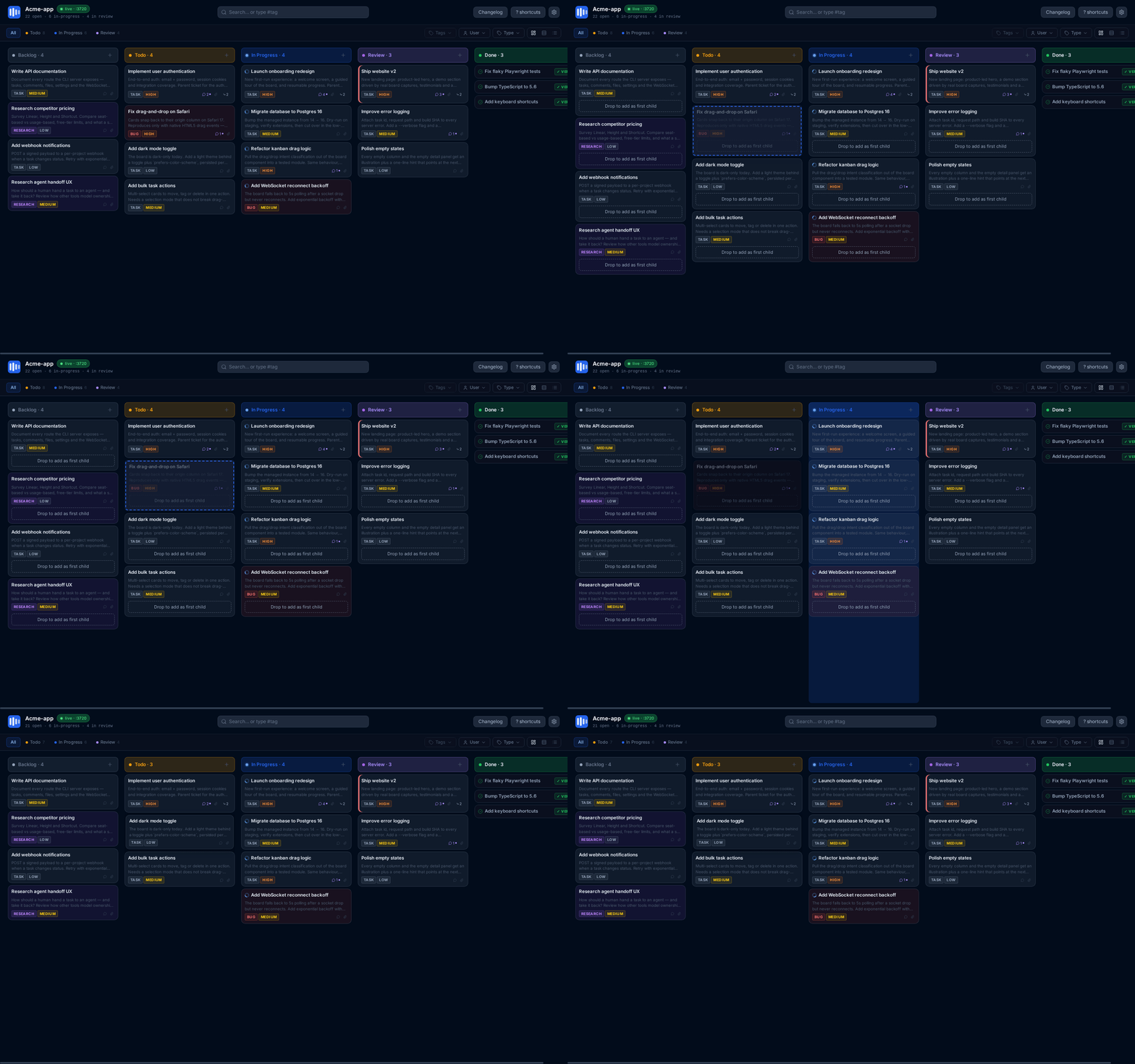
The Vibeflow kanban board running locally: a captured task is dragged out of one column and dropped into another, moving it to a different status while the board updates live.
The real board, served from the CLI on localhost — the same tasks your agent reads with tasks --next.

Bring your own agent

Works with the agent you already pay for.

No API keys, no plugin, no vendor lock-in. Tasks are plain files and the CLI is a single command, so anything that can read a file or run a shell can use Vibeflow.

  • GitHub Copilot
  • Claude Code
  • Cursor
  • Windsurf
  • opencode
  • Any CLI agent

The only prompt you need

Paste it once. --next claims the top todo task atomically, prints the selector, file and line, and moves it to in-progress — safe with several agents running at the same time.

agent prompt
"Get next tasks and implement them:
 npx @vibeflow-tools/cli tasks --next"

Install

One command. You are building.

No sign-up, no dashboard, no onboarding. Run it once with npx, or install it globally for day two.

no installation required npx @vibeflow-tools/cli kanban

Annotate any page

localhost:3700/inject

Drag the annotate bookmarklet to your bar — no code change, any page.

Or serve a folder

npx @vibeflow-tools/cli serve ./my-app

The same overlay, injected for you — an alternative to the script tag or bookmarklet.

Install for day two

npm install -g @vibeflow-tools/cli

Adds the short alias: vf kanban

Requires Node.js 22+. Any framework — context is richest with React in dev mode. Licensed Apache-2.0.

Who it is for

Built for one developer. Ready for a team.

Solo developer

Free

You build it, you own it, you ship it with an agent.

  • Annotate your own prototypes and product pages
  • Drive your agent straight from the terminal
  • Tasks in git — no external service, no account
  • Works offline, and keeps working if Vibeflow disappears
  • Parallel agents drain the backlog for you
Free Local mode · Apache-2.0 · no account, ever

Team

Beta

Designers, PMs and devs working from the same board.

  • Non-developers annotate; developers ship
  • Shared board, comments, attachments, activity
  • Same tasks your agents read from the CLI
  • Plain files, so there is nothing to migrate back out of
  • Free for early users while it is in beta
Free while in beta Team cloud · pricing announced when it leaves beta

Questions

Frequently asked.

Do I need a browser extension?

No. Vibeflow injects its annotation layer with a script tag, its own file server, or a bookmarklet. No extension, no store approval, no browser permissions — and it works on any page, including a production build.

Do I need an account or a cloud service?

No. Local mode runs entirely on your machine and stores tasks as plain JSON files inside your project. Nothing is uploaded, there is no dashboard to sign in to, and the CLI works offline.

Will it work with my framework?

Yes. React, Vue, Svelte, Next.js, plain HTML — anything that renders in a browser. Context is richest with React in development mode, or any build that ships source maps, because Vibeflow can then resolve the component, file and line number for the element you annotate.

Where are my tasks stored?

In .vibeflow/tasks/ inside your project, as versioned JSON files. No database, no proprietary format, no lock-in — commit them to git, read them with any tool, or delete the folder and nothing breaks.

How is this different from Linear, Jira or GitHub Issues?

They solve planning; Vibeflow solves context transfer. Vibeflow's task is created where the bug is visible — in the browser — with the element, file and line already attached, and it is designed to be claimed by an agent from the command line.

It stores plain JSON, so it can live alongside the tracker you already have. Keeping both is a perfectly reasonable setup.

Can several agents work in parallel?

Yes. tasks --next claims the highest-priority todo task atomically and moves it to in-progress, so two agents running at once never pick up the same work.

Is it really free?

Local mode is free and open source under Apache-2.0, and it always will be. A shared team version is in beta and free for early users; pricing has not been announced.

Stop describing bugs.
Start pointing at them.

One command, no account, and the tasks stay in your repository.

Apache-2.0 · Node.js 22+ · no account required